<?xml version="1.0" encoding="utf-8"?><feed xmlns="http://www.w3.org/2005/Atom" xml:lang="en"><generator uri="https://jekyllrb.com/" version="4.4.1">Jekyll</generator><link href="https://omkarbhilare.com/feed.xml" rel="self" type="application/atom+xml" /><link href="https://omkarbhilare.com/" rel="alternate" type="text/html" hreflang="en" /><updated>2026-10-29T03:16:17+00:00</updated><id>https://omkarbhilare.com/feed.xml</id><title type="html">Omkar Bhilare</title><subtitle>PhD candidate at the University of Toronto working on CGRA architecture and reconfigurable computing.</subtitle><author><name>Omkar Bhilare</name><email>omkar.bhilare@mail.utoronto.ca</email></author><entry><title type="html">Turning a Kobo Nia into something better with KOReader</title><link href="https://omkarbhilare.com/blog/kobo-koreader-custom-sleep-screen/" rel="alternate" type="text/html" title="Turning a Kobo Nia into something better with KOReader" /><published>2026-09-05T19:30:00+00:00</published><updated>2026-09-05T19:30:00+00:00</updated><id>https://omkarbhilare.com/blog/kobo-koreader-custom-sleep-screen</id><content type="html" xml:base="https://omkarbhilare.com/blog/kobo-koreader-custom-sleep-screen/"><![CDATA[<p align="center">
    <img width="400" src="/assets/img/kobo-sleep-screen.jpeg" />
</p>

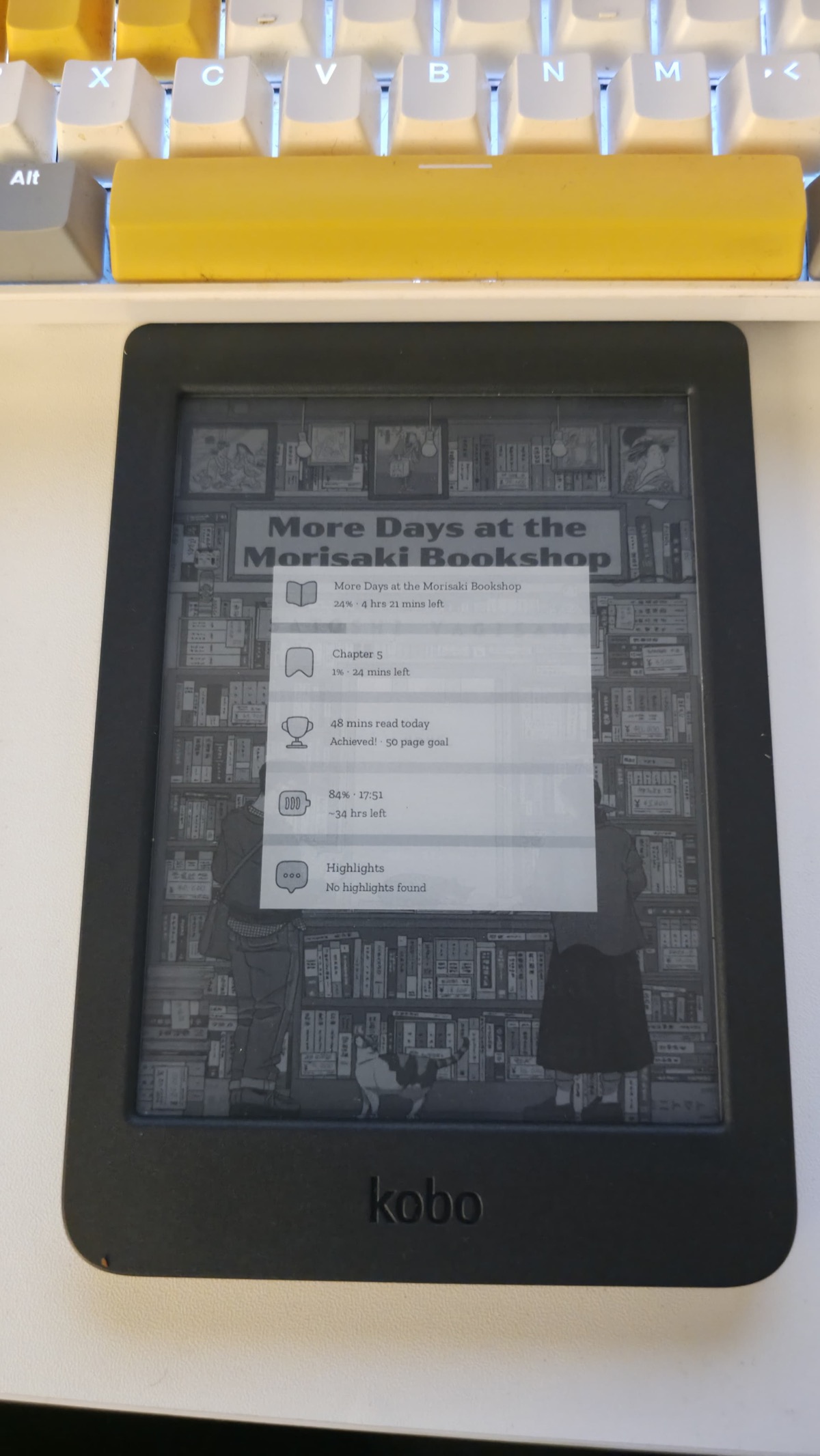
<p>That is my Kobo Nia asleep. Book cover as the background, current book and
chapter progress, how long I read today against my page goal, battery with a
time-to-empty estimate. None of that is Kobo software. It is two open-source
projects layered on a stock device, and the whole thing took an evening.</p>

<p>A quick clarification, because I see this said loosely: <strong>the Kobo itself is not
open source.</strong> The hardware is proprietary and so is Nickel, the reader UI it
ships with. What makes it interesting is that it runs Linux underneath, and Kobo
have never gone out of their way to lock it down. There is no signed-bootloader
fight here. You drop files on a USB mass-storage volume and the device picks
them up. The open-source part is what the community built on top of that
opening.</p>

<h2 id="the-two-projects">The two projects</h2>

<p><strong><a href="https://github.com/koreader/koreader">KOReader</a></strong> — an AGPL document reader
that replaces Nickel for actual reading. Better typography controls, dictionaries,
statistics, OPDS, an RSS-to-EPUB downloader. It runs on Kobo, Kindle, PocketBook,
reMarkable, Android and desktop.</p>

<p><strong><a href="https://github.com/pxlflux/customisablesleepscreen.koplugin">customisablesleepscreen.koplugin</a></strong>
by pxlflux — the plugin that draws the screen above. Reading stats, book data,
highlights, presets, icon sets, and a monochrome mode that matters if your device
is not one of the newer colour ones.</p>

<h2 id="what-i-installed-on">What I installed on</h2>

<ul>
  <li>Kobo Nia, firmware 4.38.23684</li>
  <li>KOReader v2026.07.1</li>
  <li>Customisable Sleep Screen v2.2.0</li>
  <li>A MacBook</li>
</ul>

<p>Check your firmware at <strong>Home → More → Settings → Device information</strong> before
anything else. Kobo’s 5.x firmware has a heavily reworked userland and the
install path below is written for 4.x.</p>

<h2 id="step-1-pick-a-launcher-and-pick-only-one">Step 1: pick a launcher, and pick only one</h2>

<p>KOReader needs something to launch it, because Nickel has no concept of third
party apps. Two live options:</p>

<ul>
  <li><strong><a href="https://github.com/pgaskin/NickelMenu">NickelMenu</a></strong> — adds entries to
Nickel’s own menu.</li>
  <li><strong><a href="https://github.com/NiLuJe/kfmon">KFMon</a></strong> — watches for a “book” being
opened and launches the app instead.</li>
</ul>

<p>I went with NickelMenu for one reason: <strong>it survives official Kobo firmware
updates.</strong> KFMon is disabled by every firmware update and has to be reinstalled.
They are mutually exclusive, so decide once.</p>

<p>Download NickelMenu’s <code class="language-plaintext highlighter-rouge">KoboRoot.tgz</code>, plug the Kobo in, tap <strong>Connect</strong>, and drop
it in as-is:</p>

<div class="language-bash highlighter-rouge"><div class="highlight"><pre class="highlight"><code><span class="nb">cp</span> <span class="nt">-X</span> ~/Downloads/KoboRoot.tgz /Volumes/KOBOeReader/.kobo/
</code></pre></div></div>

<p>Leave it compressed. The device extracts it on next boot and deletes it. That
deletion is your success signal — if <code class="language-plaintext highlighter-rouge">KoboRoot.tgz</code> is still sitting there after
a reboot, it did not take.</p>

<h2 id="step-2-koreader-itself">Step 2: KOReader itself</h2>

<p>Grab <code class="language-plaintext highlighter-rouge">koreader-kobo-*.zip</code> from the
<a href="https://github.com/koreader/koreader/releases">releases</a>, then:</p>

<div class="language-bash highlighter-rouge"><div class="highlight"><pre class="highlight"><code>ditto <span class="nt">-x</span> <span class="nt">-k</span> <span class="nt">--norsrc</span> <span class="nt">--noextattr</span> ~/Downloads/koreader-kobo-v2026.07.1.zip /tmp/ko
<span class="nb">mkdir</span> <span class="nt">-p</span> /Volumes/KOBOeReader/.adds
ditto <span class="nt">--norsrc</span> <span class="nt">--noextattr</span> /tmp/ko/koreader /Volumes/KOBOeReader/.adds/koreader
</code></pre></div></div>

<p>Verify this file exists and note the depth:</p>

<div class="language-bash highlighter-rouge"><div class="highlight"><pre class="highlight"><code><span class="nb">ls</span> /Volumes/KOBOeReader/.adds/koreader/koreader.sh
</code></pre></div></div>

<p>It must <strong>not</strong> end up at <code class="language-plaintext highlighter-rouge">.adds/koreader/koreader/koreader.sh</code>. Double-nesting
is the single most common install failure.</p>

<h2 id="step-3-stop-nickel-flooding-your-library">Step 3: stop Nickel flooding your library</h2>

<p>On firmware 4.17 and newer, Nickel will happily index the hidden directories you
just created and fill your library with hundreds of junk entries. Edit
<code class="language-plaintext highlighter-rouge">.kobo/Kobo/Kobo eReader.conf</code> and add:</p>

<div class="language-ini highlighter-rouge"><div class="highlight"><pre class="highlight"><code><span class="nn">[FeatureSettings]</span><span class="w">
</span><span class="py">ExcludeSyncFolders</span><span class="p">=</span><span class="s">(</span><span class="se">\\</span><span class="s">.(?!kobo|adobe).+|([^.][^/]*/)+</span><span class="se">\\</span><span class="s">..+)</span>
</code></pre></div></div>

<p>Back the file up first. The <strong>doubled backslashes are literal</strong> — that is Qt’s
ini escaping, not a typo, and not something to “fix”. I verified the bytes on
disk after writing it.</p>

<p>Encouragingly, Nickel rewrites this file on shutdown and preserves the key.</p>

<h2 id="step-4-the-launcher-entry">Step 4: the launcher entry</h2>

<div class="language-bash highlighter-rouge"><div class="highlight"><pre class="highlight"><code><span class="nb">mkdir</span> <span class="nt">-p</span> /Volumes/KOBOeReader/.adds/nm
<span class="nb">echo</span> <span class="s1">'menu_item:main:KOReader:cmd_spawn:quiet:exec /mnt/onboard/.adds/koreader/koreader.sh'</span> <span class="se">\</span>
  <span class="o">&gt;</span> /Volumes/KOBOeReader/.adds/nm/koreader
</code></pre></div></div>

<p>Use <code class="language-plaintext highlighter-rouge">echo</code>, not a text editor. TextEdit silently appends <code class="language-plaintext highlighter-rouge">.txt</code> and NickelMenu
will ignore the file without telling you.</p>

<h2 id="step-5-the-sleep-screen-plugin">Step 5: the sleep screen plugin</h2>

<p>Download the latest <a href="https://github.com/pxlflux/customisablesleepscreen.koplugin/releases">release
zip</a> and
drop the folder into KOReader’s plugins directory:</p>

<div class="language-bash highlighter-rouge"><div class="highlight"><pre class="highlight"><code>ditto <span class="nt">--norsrc</span> <span class="nt">--noextattr</span> customisablesleepscreen.koplugin <span class="se">\</span>
  /Volumes/KOBOeReader/.adds/koreader/plugins/customisablesleepscreen.koplugin
</code></pre></div></div>

<p>Take the <strong>tagged release</strong>, not <code class="language-plaintext highlighter-rouge">main</code>. I checked the commits sitting on main
above the release and they were translations and a webp feature — nothing worth
the risk of an untested tree.</p>

<p>Then eject, and this is the step people skip:</p>

<div class="language-bash highlighter-rouge"><div class="highlight"><pre class="highlight"><code>dot_clean <span class="nt">-m</span> /Volumes/KOBOeReader
diskutil eject /Volumes/KOBOeReader
</code></pre></div></div>

<h2 id="the-macos-trap">The macOS trap</h2>

<p>The Kobo is FAT32. macOS writes AppleDouble <code class="language-plaintext highlighter-rouge">._</code> sidecar files all over it, and
Nickel displays them as phantom library entries.</p>

<p>Every guide tells you to use <code class="language-plaintext highlighter-rouge">cp -X</code> and <code class="language-plaintext highlighter-rouge">ditto --norsrc --noextattr</code> to prevent
this. I did, and then counted:</p>

<ul>
  <li>copying 10 books with <code class="language-plaintext highlighter-rouge">cp -X</code> produced <strong>10</strong> <code class="language-plaintext highlighter-rouge">._</code> files</li>
  <li>installing the sleep screen plugin produced <strong>164</strong></li>
</ul>

<p><code class="language-plaintext highlighter-rouge">cp -X</code> did not stop them, because the source files carry extended attributes of
their own. <strong><code class="language-plaintext highlighter-rouge">dot_clean -m</code> is the step that actually does the work.</strong> Run it
before every eject and stop worrying about which copy flag you used.</p>

<p>Two smaller ones:</p>

<ul>
  <li>If <code class="language-plaintext highlighter-rouge">diskutil eject</code> fails with <em>“dissented by PID … zsh”</em>, that is just a
terminal window whose working directory is on the volume. <code class="language-plaintext highlighter-rouge">cd ~</code> and try
again. Do not force it.</li>
  <li>Hidden folders in Finder: <code class="language-plaintext highlighter-rouge">Cmd+Shift+Period</code>.</li>
</ul>

<h2 id="turning-the-sleep-screen-on">Turning the sleep screen on</h2>

<p>Installing the plugin does nothing visible. I spent a while confused here, so:</p>

<ol>
  <li><strong>Fully exit KOReader and relaunch.</strong> Plugins load only at startup.</li>
  <li>☰ → <strong>Settings → Screen → Customisable sleep screen</strong></li>
  <li>Tick <strong>Enable customisable sleep screen</strong></li>
  <li>Press power <strong>while still inside KOReader</strong>, with a book open</li>
</ol>

<p>Step 4 is the one that catches people. Your Kobo has <em>two</em> sleep screens. Press
power on the Kobo home screen and you get Nickel’s, and the plugin is never
consulted — it is a KOReader feature, and KOReader has to be the thing running.
Looking at the source, the plugin hands control straight back to stock KOReader
unless KOReader’s own <code class="language-plaintext highlighter-rouge">screensaver_type</code> setting equals <code class="language-plaintext highlighter-rouge">customisable_ss</code>, which
is exactly what that checkbox writes.</p>

<p>If your device is monochrome like the Nia, switch it to <strong>monochrome mode</strong>. The
defaults are tuned for the colour Kobos and the coloured progress bars turn to
mud on 16-level grayscale. Book cover as background is the setting that makes it
look like the photo above.</p>

<h2 id="worth-it">Worth it?</h2>

<p>The reading statistics alone changed how I use the thing — a page goal on the
sleep screen is a surprisingly effective nudge. But the part I keep thinking
about is that all of this is just files on a USB volume. No jailbreak, no
warranty theatre, no account. Official firmware updates are still safe to take,
NickelMenu survives them, and deleting <code class="language-plaintext highlighter-rouge">.adds/koreader</code> and <code class="language-plaintext highlighter-rouge">.adds/nm</code> puts
everything back exactly as it was.</p>

<p>Next on my list is KOReader’s News Downloader, which turns RSS feeds into EPUBs
on the device — the plan being to push my own generated content to the reader
from a small server.</p>

<p><strong>Links:</strong>
<a href="https://github.com/koreader/koreader">KOReader</a> ·
<a href="https://github.com/koreader/koreader/wiki/Installation-on-Kobo-devices">Kobo install wiki</a> ·
<a href="https://github.com/pxlflux/customisablesleepscreen.koplugin">Customisable Sleep Screen</a> ·
<a href="https://github.com/pgaskin/NickelMenu">NickelMenu</a></p>]]></content><author><name>Omkar Bhilare</name><email>omkar.bhilare@mail.utoronto.ca</email></author><category term="informative" /><category term="informative" /><summary type="html"><![CDATA[Installing KOReader and a customisable sleep screen on a Kobo e-reader, and the macOS gotchas nobody warns you about]]></summary><media:thumbnail xmlns:media="http://search.yahoo.com/mrss/" url="https://omkarbhilare.com/assets/img/og-preview.jpg" /><media:content medium="image" url="https://omkarbhilare.com/assets/img/og-preview.jpg" xmlns:media="http://search.yahoo.com/mrss/" /></entry><entry><title type="html">Summer EPFL Offer from LAP LAB</title><link href="https://omkarbhilare.com/blog/epfl/" rel="alternate" type="text/html" title="Summer EPFL Offer from LAP LAB" /><published>2022-01-25T17:39:00+00:00</published><updated>2022-01-25T17:39:00+00:00</updated><id>https://omkarbhilare.com/blog/epfl</id><content type="html" xml:base="https://omkarbhilare.com/blog/epfl/"><![CDATA[<p align="center">
    <img width="602" height="606" src="/assets/img/2022-03-18-15-36-58.png" />
</p>

<h2 id="about-summer-epfl-program">About Summer EPFL Program:</h2>

<p>The School of Computer and Communication Sciences of the École polytechnique fédérale de Lausanne (EPFL) offers summer fellowships to international students. Participants get the chance to learn new skills and to gain hands-on experience in their chosen field while collaborating with leading senior scientists.</p>

<p>Fellowship recipients will participate into the life of a research unit, typically to help solve problems which are usually part of major research efforts. Often, this will lead to performing challenging programming or design tasks to prove new concepts. Accepted students will receive a living allowance of CHF 1,600.- per month (pro rata to the actual duration) and a refund of travelling costs (2nd class train ticket or low-cost/economy airfare).</p>

<h2 id="application-period--process">Application Period &amp; Process:</h2>

<p align="center">
    <img width="440" height="420" src="/assets/img/2022-03-18-15-42-09.png" />
</p>

<ul>
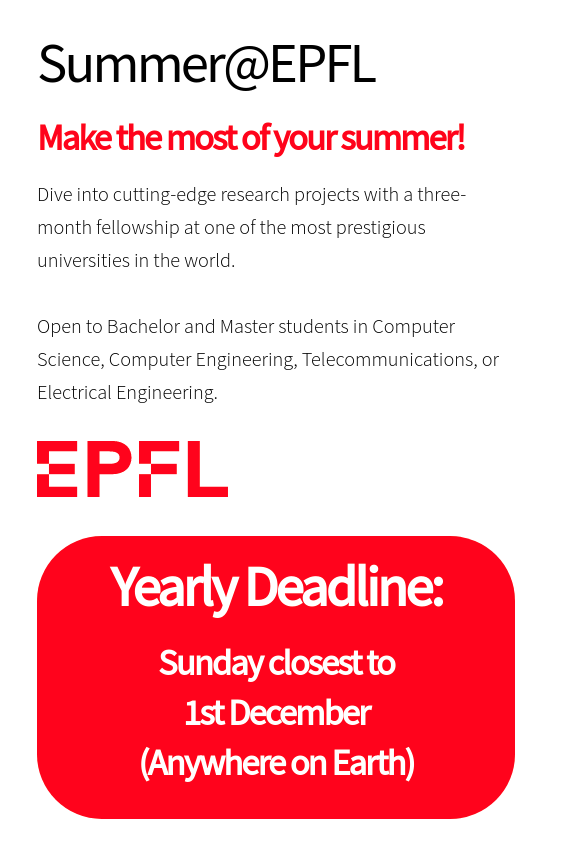
  <li>The deadline for Summer EPFL 2022 was 1 December, 2021.</li>
  <li>One needs to give following documents:
    <ul>
      <li>CV</li>
      <li>Official Transcript</li>
      <li>Letter of Motivation</li>
      <li>professor preference (Optional But recommended)</li>
    </ul>
  </li>
  <li>Note LORs are not required in the Summer EPFL Program</li>
</ul>

<h2 id="post-application">Post Application:</h2>

<p>Once the Application is done, most people start hearing about interviews for labs in between end december to mid jan. You could send a mail to prof and try communicating with phd docs for your application.I had mailed My professor and after few days I had received a Interview call from LAP Lab. <br />
The interview was a very shot call, a just about duration of 20 minutes. In which we discuss my past research projects, few FPGA related questions and later after a day I got to know I was selected as a Intern in Summer EPFL for LAP LAB.</p>

<h2 id="visa-accommodation-and-others">Visa, Accommodation and Others:</h2>

<ul>
  <li>First of all professors will introduce you to lab admin, who really helping me a lot with arranging Visa, accommodation and flight tickets.</li>
  <li>EPFL does reimburse Economy Flight tickets of students coming up in summer epfl, my lab admin had directly booked those tickets for me.</li>
  <li>For VISA process we need to wait for authority letter to come, which comes by march end in my case.</li>
  <li>For accommodation fmel is recommended.</li>
</ul>]]></content><author><name>Omkar Bhilare</name><email>omkar.bhilare@mail.utoronto.ca</email></author><category term="informative" /><category term="informative" /><summary type="html"><![CDATA[This summer I'm going to work with LAP LAB @ EPFL]]></summary><media:thumbnail xmlns:media="http://search.yahoo.com/mrss/" url="https://omkarbhilare.com/assets/img/og-preview.jpg" /><media:content medium="image" url="https://omkarbhilare.com/assets/img/og-preview.jpg" xmlns:media="http://search.yahoo.com/mrss/" /></entry><entry><title type="html">Report of Verification Intern at SHAKTI</title><link href="https://omkarbhilare.com/blog/shakti/" rel="alternate" type="text/html" title="Report of Verification Intern at SHAKTI" /><published>2021-07-30T17:39:00+00:00</published><updated>2021-07-30T17:39:00+00:00</updated><id>https://omkarbhilare.com/blog/shakti</id><content type="html" xml:base="https://omkarbhilare.com/blog/shakti/"><![CDATA[<iframe src="/pdf/SHAKTI_REPORT.pdf" style="width:800px; height:1024px;" frameborder="0"></iframe>]]></content><author><name>Omkar Bhilare</name><email>omkar.bhilare@mail.utoronto.ca</email></author><category term="project" /><category term="project" /><summary type="html"><![CDATA[Detailed report of the work that I have done during SHAKTI internship]]></summary><media:thumbnail xmlns:media="http://search.yahoo.com/mrss/" url="https://omkarbhilare.com/assets/img/og-preview.jpg" /><media:content medium="image" url="https://omkarbhilare.com/assets/img/og-preview.jpg" xmlns:media="http://search.yahoo.com/mrss/" /></entry></feed>